![special-case-sl-logo.png]](https://help.seedlegals.com/hs-fs/hubfs/special-case-sl-logo.png?width=165&height=18&name=special-case-sl-logo.png)
First, if you're wondering how options differ from shares then have a look at this article, shares versus options: what's the difference?
We always recommend options to your employees, advisors and consultants for a few reasons:
-
Options forward vest, you can issue options when they complete the work and you won't have to complete a share buy back / share transfer if you end the contract in the vesting period.
-
You can choose when the options are exercised as a company allowing you to keep them off the cap table so you don't have to revert back to them for shareholder votes and you can keep the voting power within the founding team.
-
Options are tax efficient if you are issuing them to employees because they can claim through the EMI scheme.
If you're looking to issue options you first need to have an option pool in place. An option pool is a ringfenced percentage of your share capital which you have authority from your shareholders, Board, investors to allot. They are generally unissued shares.
In this article below I will go through how to create an option pool in a funding round, outside of a funding round and how to represent that on SeedLegals.
How to create an option pool in a funding round?
If you're a venture backed company and you're looking to grant options and issue options we always recommend creating an option pool in a funding round. This is the easiest way to create an option pool as it allows you to get all the relevant documents approved in the round, you can do it with the click of a button through the SeedLegals funding round products, and it is often expected from investors.
So if you're planning on doing a funding round soon, create your option pool as part of the round! Have a look at this article on how to size an employee option pool, using data from over 200 funding rounds.
How to create an option pool outside of a funding round?
You may want to create an option pool outside of your funding round, maybe you don't plan on raising investment for a while (or ever) and you have some advisors/consultants/employees that you want to grant options to immediately.
1. Create a new pool or add an existing pool
From the Cap Table window on the left hand side, you can go to the Options tab and then click on 'Create/Update Option pool'.
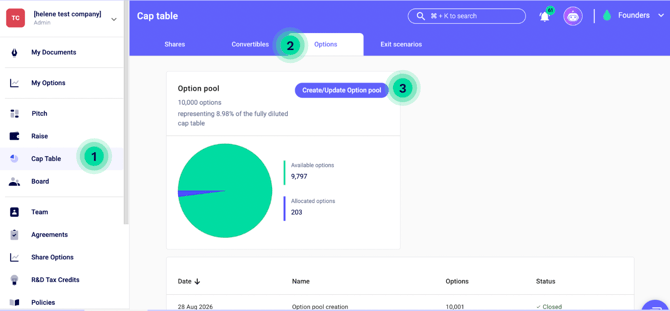
You will then be prompted to either 'Create with approval documents' or 'Create without documents'.
Select 'Create with approval documents' if you haven't yet received any of the necessary consents from shareholders, investors, and Board members. You'll need to sign the approval documents on the platform.
Select 'Create without documents' if you have already received those consents off platform and just need to reflect an existing option pool. Once this is done, you're all set and ready to proceed with the scheme!
2. Get your documents signed
If you're creating the option pool and signing the approval documents on the platform, you'll need to enter the amount of options you want to have in the pool.
Once you enter an amount, you will have access to three different documents:
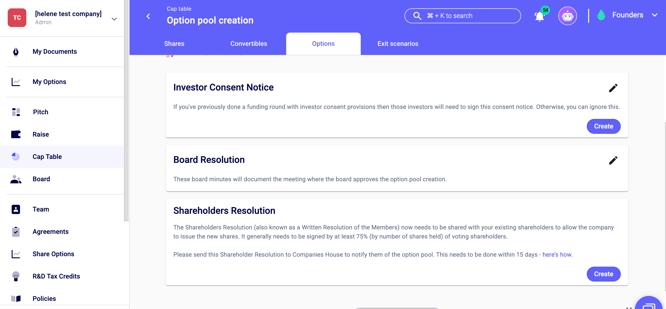
Check your Shareholders Agreement to confirm if you need investor majority consent to increase your company share capital and create an option pool. If you don't need investor majority consent, then skip this document.
Hold a Board meeting to approve the option pool creation, set the details of the Board Resolution, and then the chairperson will sign the Board Resolution.
Create the Shareholders Resolution, send to all shareholders, get it signed by at least 75% of voting shareholders, and then upload it to Companies House within 15 days.
3. Approve the option pool
Please click 'Approve option pool' after you've gotten those documents signed.
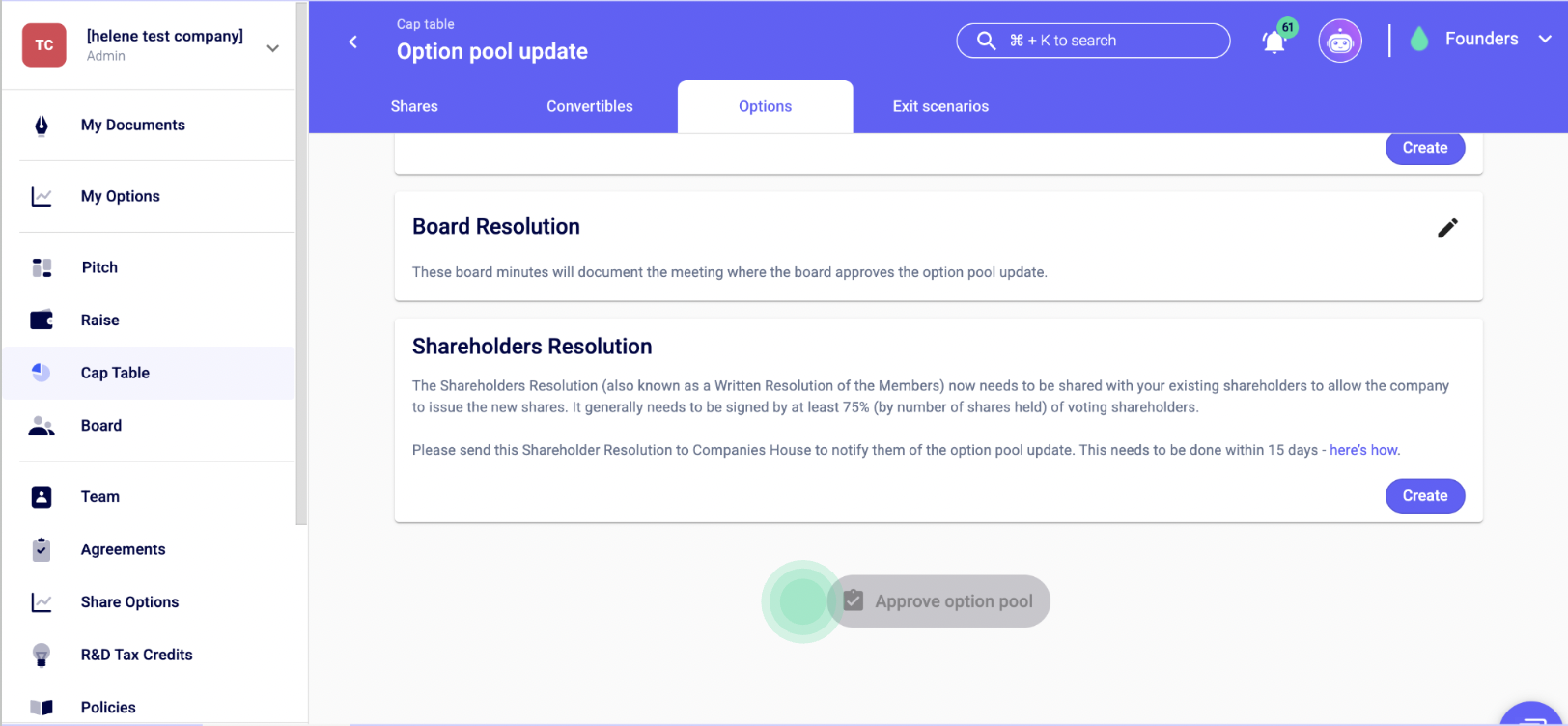
Congratulations, you have just set up an option pool!
For more guide on everything options and option scheme related visit our help centre.