![special-case-sl-logo.png]](https://help.seedlegals.com/hs-fs/hubfs/special-case-sl-logo.png?width=165&height=18&name=special-case-sl-logo.png)
1. Use Incognito mode
If you’ve accessed multiple SeedLegals accounts from the same computer, your browser might be "remembering" the wrong login details. This can cause the login to fail or redirect you to the wrong profile.
To fix this, try opening a New Incognito Window (Chrome) or Private Browsing tab (Safari/Firefox) and log in from there. This ensures you are starting with a clean slate without any old "cookies" getting in the way.
2. Double check your login credentials
Have you checked the following:- Email address: did you create your account using a Google or LinkedIn account? If in doubt, do not hesitate to send us a message on the chat so that we can check for you.
- Email address: you haven't used a Google or LinkedIn account and you can't remember which email address was used to create your account? Do not hesitate to contact us so that we can check for you!
3. You have changed your email address
- Log out of SeedLegals by clicking on https://app.seedlegals.com/logout
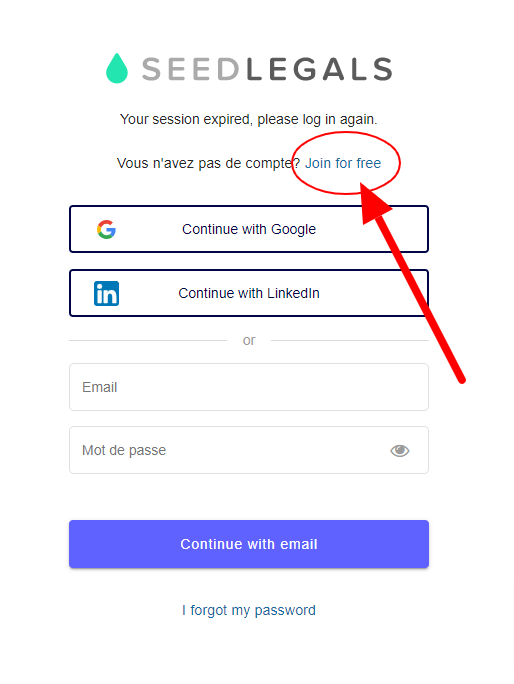
- Now go back to Seedlegals.com and then "Login"
- Select Join for free (as a new user)
Then :
- enter your new email address
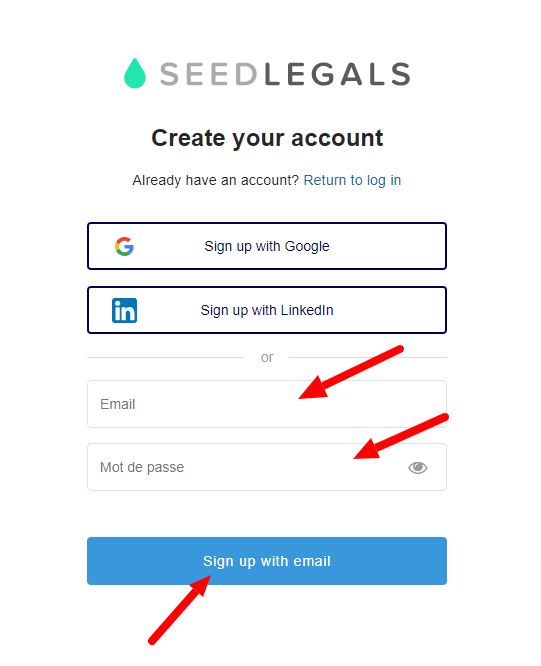
- create your new password
- Click Sign up with email
You will then be redirected to your SeedLegals profile.
🚫Warning: Be sure to select "Join for free" then "Sign up with email!"
Any questions?
If you have any further questions, click the bottom right button to message us in chat - we'll be happy to help.