![special-case-sl-logo.png]](https://help.seedlegals.com/hs-fs/hubfs/special-case-sl-logo.png?width=165&height=18&name=special-case-sl-logo.png)
Looking to sell or transfer shares to a new owner? Follow these simple steps to do it straight from your SeedLegals dashboard.
-
If you're looking to give equity to a co-founder or team member, and your company has not raised funding yet, it might be easier to create new shares instead of transferring yours.
If you still want to transfer shares, you've come to the right place, SeedLegals automates everything, here’s what to do:
1: Create a New Share Transfer
-
Select Shares in the left menu, then click the Share Transfers tab
-
Select New Share Transfer

-
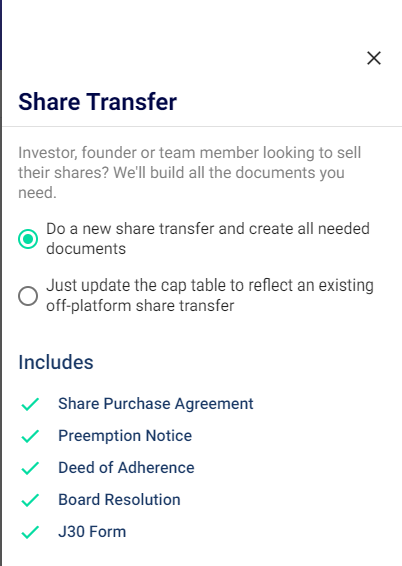
A share transfer costs £299 + VAT when completed on-platform, as the platform generates all the necessary documentation required to complete the transfer. If the transfer has already been completed off-platform and you simply need to update your cap table to reflect the change, select Option 2: "Just update the cap table to reflect the transfer..."
2: Enter the Transfer Details
-
Select the Seller (which needs to be an existing shareholder in the cap table)
-
Select the Buyer (or create them as a new user or company as needed)
-
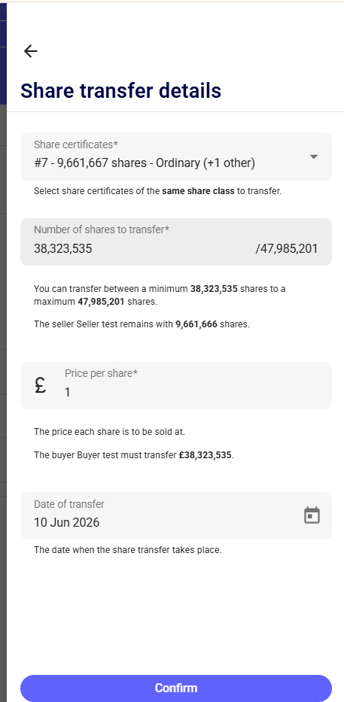
Enter the share transfer details:
- Select the share certificate(s) – If the selling shareholder holds shares from multiple issuances or funding rounds and therefore has multiple share certificates, you can select shares from more than one certificate. The platform will automatically generate a single consolidated share certificate for the buyer.
- Enter the number of shares to transfer.
- Enter the price per share.
- Enter the transfer date.
Once all details have been entered, click Confirm to proceed.
Completing the Share Transfer Workflow
1. Deal Terms
Once the share transfer details have been confirmed, you will see a workflow. Start by clicking Set Details of Deal Terms.
Based on your answers, the platform will automatically generate the documents required to complete the transfer. For example, if the company has previously raised investment, check the Articles of Association to see whether pre-emption rights apply to share transfers. If they do, select Yes in the Deal Terms section and the platform will generate a pre-emption notice to send to shareholders.
If your round was completed on SeedLegals, and you are unsure - reach out to us. We'd be happy to let you know whether you need this!
Important: Check the company's Articles to see if investor consent is required before approving the transfer.
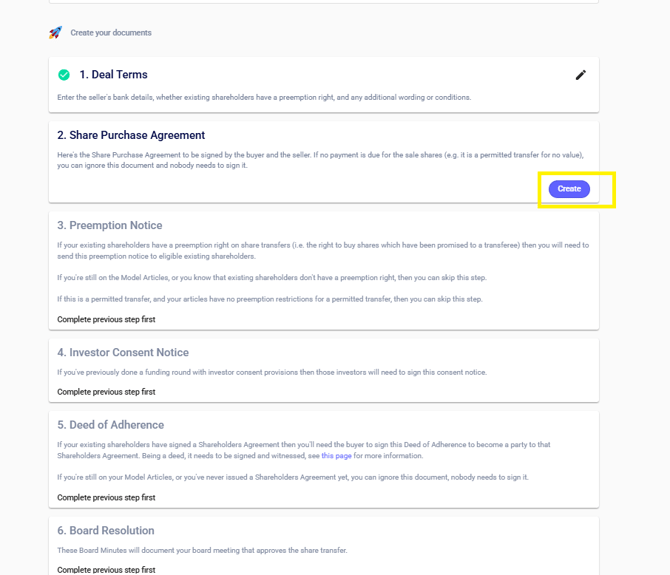
2. Share Purchase Agreement
Click Create to generate the Share Purchase Agreement.
At this stage, the £299 + VAT fee will be charged and the remaining documents in the workflow will be unlocked.
Note: If it is a nil transfer (for example, where the transfer is a permitted transfer for no consideration), you can ignore this document and no signatures will be required.

3. Create and Sign the Deed of Adherence
This document brings the new shareholder within the terms of your existing Shareholders Agreement. As this is a Deed, it will need to be witnessed, for more on this see here

4. Create your Board Resolution
This document is the official company approval of the transfer.

5. Create and Sign the J30
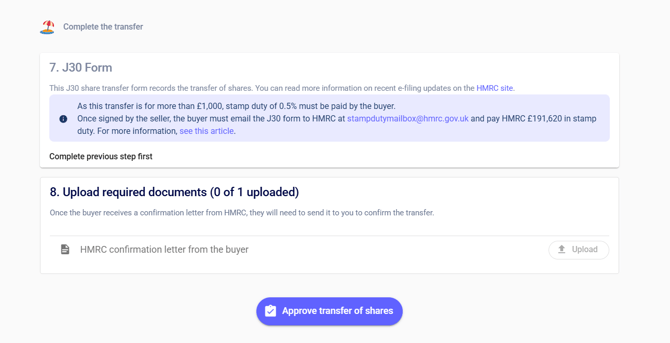
Where the consideration for the transfer exceeds £1,000, the buyer must pay stamp duty at 0.5% of the purchase price.
Once the J30 form has been signed by the seller, the buyer should:
- Email the signed J30 form to stampdutymailbox@hmrc.gov.uk.
- Pay the applicable stamp duty to HMRC.
- Follow HMRC's guidance regarding the stamping process.
When HMRC confirms that the stamp duty has been paid, the buyer must provide the confirmation letter to the company.
6. Approve the Transfer
Upload the HMRC confirmation letter (PDF) to the platform and click Approve Transfer of Shares. This will complete the share transfer process.
Make sure the documents above are all correct and signed prior to doing this!
7. Sign and send the new Share Certificates
Finally, navigate to Shares > Share Certificates and sign the newly issued share certificate.
Once the new share certificate has been signed, the share transfer process is fully complete.
Need help? We're here to help. Click the live chat icon to chat with the team.