---
title: Comment ajouter un nouvel utilisateur ?
description: Comment ajouter un utilisateur sur SeedLegals en 3 étapes.
---
[Passer au contenu](https://help.seedlegals.com/fr/comment-ajouter-un-nouvel-utilisateur#main-content)
- [Français](https://help.seedlegals.com/fr/comment-ajouter-un-nouvel-utilisateur)
- [English](https://help.seedlegals.com/en/2708122-how-to-add-a-user)
Français
Afficher le sous-menu pour les traductions
[![special-case-sl-logo.png\]](https://help.seedlegals.com/hs-fs/hubfs/special-case-sl-logo.png?width=165&height=18&name=special-case-sl-logo.png)](https://seedlegals.com/fr/)
- [Ressources](https://seedlegals.com/fr/ressources-articles/)
Ouvrir la navigation principale
Fermer la navigation principale
- [Ressources](https://seedlegals.com/fr/ressources-articles/)
- - [Français](https://help.seedlegals.com/fr/comment-ajouter-un-nouvel-utilisateur)
- [English](https://help.seedlegals.com/en/2708122-how-to-add-a-user)
Français
Afficher le sous-menu pour les traductions
- [Accueil](https://seedlegals.com/fr/)
[Accueil](https://seedlegals.com/fr/)
Que recherchez-vous ?
- Il n'y a aucune suggestion car le champ de recherche est vide.
1. [Help Centre (UK)](https://help.seedlegals.com/fr?hsLang=fr)
2. [Compte & Paramètres](https://help.seedlegals.com/fr/compte-param%C3%A8tres?hsLang=fr)
3. [Paramètres](https://help.seedlegals.com/fr/compte-param%C3%A8tres?hsLang=fr#param%C3%A8tres)
# Comment ajouter un nouvel utilisateur ?
## Comment ajouter un utilisateur sur SeedLegals en 3 étapes.
🌍 You have a French company and only speak English?
[😌 Not to worry, find the English translation of this article below! 👇](https://help.seedlegals.com/fr/comment-ajouter-un-nouvel-utilisateur#English)
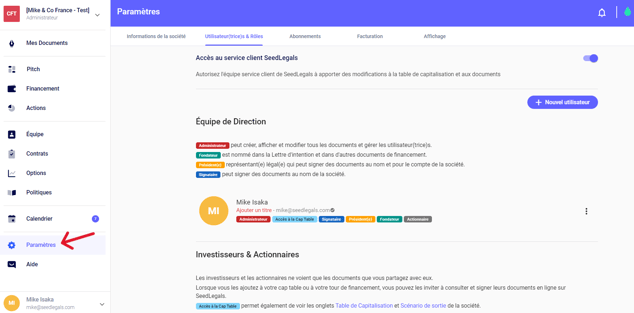
1\. Connectez-vous sur SeedLegals, et sélectionnez l'onglet **"Paramètres"** en bas à gauche de votre écran.
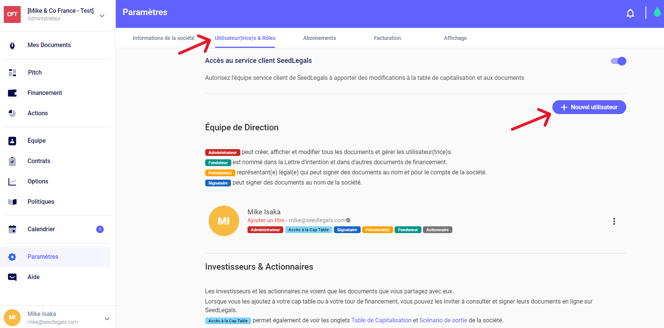
2\. Dans la barre horizontale en haut de votre écran, sélectionnez **"Utilisateur(trice)s & Rôles''**. Sur cette page, vous verrez le bouton **''+ Nouvel utilisateur''**. Cliquez dessus et une fenêtre apparaîtra.
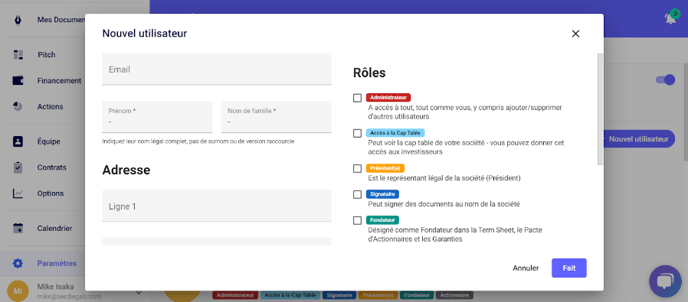
3\. Ici, vous pouvez remplir toutes les informations concernant le nouvel utilisateur :
- Email
- Prénom
- Nom
- Adresse postale
Vous pouvez leur donner leurs rôles appropriés en **cochant sur les cases à côté de chaque rôle.**
Chaque rôle donne un certain niveau d'accès et de droits sur la plateforme. Ces droits sont également décrits juste en bas. Une fois fini, vous pouvez cliquer sur **"Fait".**
Une fois créé, cliquez sur **la petite enveloppe** à côté du nom de l'utilisateur afin qu'il ou elle reçoive une invitation pour se connecter et vérifier son compte SeedLegals.

**ATTENTION** : L'utilisateur doit créer un compte avec l’adresse email que vous avez renseigné.
### Des questions ?
Si jamais vous avez du mal à ajouter un nouvel utilisateur, n’hésitez pas à solliciter l’équipe sur le chat en bas à droite de votre écran. 🐱💬
---
### How to add a user
#### Need to add a co-founder, advisor, consultant, or employee? Here's how.
You've created your account on SeedLegals, and now you want to add someone else to the platform to take a look (your co-founder for example), or you want to add a new employee, advisor or consultant to sign on their legal documents.
Here's how to do it:
### **ADDING A USER:**
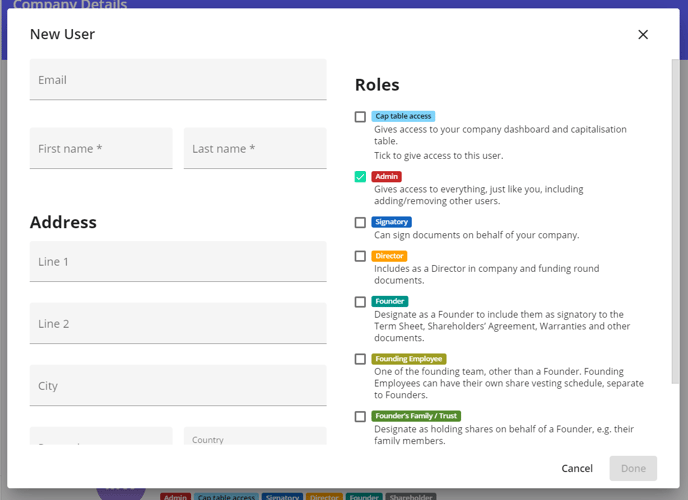
1. Select **Settings** in the left menu, then the **Users & Roles** tab.
2. Click the **New User** button at the top right.
3. Enter the email address, first and last name of the person you want to add, then tick the roles that you want to give to that person (normally Founders will get the following roles: Cap Table access, Admin, Signatory, Director and Founder, Employees will not usually get any role, and Advisors/Consultants may get Director role or Cap Table access etc.) and click on Done.
**Important:** do not give Admin rights to anyone, apart from the core team of the company. This role is usually reserved for founders or directors.
### **INVITING A USER:**
1. When the profile is created, click on the envelope icon next to their name. This will send them an email invitation to join the platform and your company.
2. The platform will then send them an invite which will allow them to verify their email address.
Once verified, the envelope will disappear.

You have now successfully added a new user on SeedLegals, and invited them to the platform. [Please see this article on how to edit users on SeedLegals.](https://help.seedlegals.com/en/3709500-how-do-i-change-another-user-s-details?hsLang=fr)
### **SHARE AN AGREEMENT WITH THE USER:**
1. If you want to share an agreement with the new user (e.g. your advisor) just go to that document (normally under the Agreements tab), and now once you click on the "Create New Agreement" button, the new user will appear in the drop-down list, please select that user.
2. Once you fill in the details and create the appropriate agreement, just click the Actions button (top right), and select **Invite to View and Sign**, and then share it with that user.
3. Lastly, when the user signs in next time, their agreement will be in their documents folder, ready for them to review and e-sign.
### Any questions?
If you have any further questions, click the bottom right button to message us in chat - we'll be happy to help.
- [Compte & Paramètres](https://help.seedlegals.com/fr/compte-param%C3%A8tres?hsLang=fr#main-content)
- [Créer le compte de votre société](https://help.seedlegals.com/fr/compte-param%C3%A8tres?hsLang=fr#cr%C3%A9er-le-compte-de-votre-soci%C3%A9t%C3%A9)
- [Paramètres](https://help.seedlegals.com/fr/compte-param%C3%A8tres?hsLang=fr#param%C3%A8tres)
- [Se connecter](https://help.seedlegals.com/fr/compte-param%C3%A8tres?hsLang=fr#se-connecter)
- [Abonnements](https://help.seedlegals.com/fr/compte-param%C3%A8tres?hsLang=fr#abonnements)
- [Facturation & Modes de paiments](https://help.seedlegals.com/fr/compte-param%C3%A8tres?hsLang=fr#facturation-modes-de-paiments)
- [Mon Profil](https://help.seedlegals.com/fr/compte-param%C3%A8tres?hsLang=fr#mon-profil)
- [Ressources et Outils pour la Levée de Fonds](https://help.seedlegals.com/fr/ressources-et-outils-pour-la-lev%C3%A9e-de-fonds?hsLang=fr#main-content)
- [Levée de fonds : Vidéos eLearning](https://help.seedlegals.com/fr/ressources-et-outils-pour-la-lev%C3%A9e-de-fonds?hsLang=fr#lev%C3%A9e-de-fonds-vid%C3%A9os-elearning)
- [Simulateurs & Base de données](https://help.seedlegals.com/fr/ressources-et-outils-pour-la-lev%C3%A9e-de-fonds?hsLang=fr#simulateurs-base-de-donn%C3%A9es)
- [FAQs](https://help.seedlegals.com/fr/faqs?hsLang=fr#main-content)
- [Documents](https://help.seedlegals.com/fr/faqs?hsLang=fr#documents)
- [Signature](https://help.seedlegals.com/fr/faqs?hsLang=fr#signature)
- [Associé(es) & Investisseur(es)](https://help.seedlegals.com/fr/faqs?hsLang=fr#associ%C3%A9es-investisseures)
- [Langues & Traductions](https://help.seedlegals.com/fr/faqs?hsLang=fr#langues-traductions)
- [Formalités Juridiques](https://help.seedlegals.com/fr/faqs?hsLang=fr#formalit%C3%A9s-juridiques)
- [Table de Capitalisation](https://help.seedlegals.com/fr/table-de-capitalisation?hsLang=fr#main-content)
- [Table de capitalisation](https://help.seedlegals.com/fr/table-de-capitalisation?hsLang=fr#table-de-capitalisation)
- [Création de SAS/SASU](https://help.seedlegals.com/fr/table-de-capitalisation?hsLang=fr#cr%C3%A9ation-de-sas-sasu)
- [Division de la Valeur Nominale](https://help.seedlegals.com/fr/table-de-capitalisation?hsLang=fr#division-de-la-valeur-nominale)
- [Cession d'actions](https://help.seedlegals.com/fr/table-de-capitalisation?hsLang=fr#cession-dactions)
- [Classes d'actions](https://help.seedlegals.com/fr/table-de-capitalisation?hsLang=fr#classes-dactions)
- [Registre des Actionnaires avec Pappers Services](https://help.seedlegals.com/fr/table-de-capitalisation?hsLang=fr#registre-des-actionnaires-avec-pappers-services)
- [Pitch](https://help.seedlegals.com/fr/pitch?hsLang=fr)
- [Avantages Fiscaux pour les Investisseur(e)s](https://help.seedlegals.com/fr/avantages-fiscaux-pour-les-investisseures?hsLang=fr#main-content)
- [Eligibilité au régime fiscal anglais SEIS/EIS](https://help.seedlegals.com/fr/avantages-fiscaux-pour-les-investisseures?hsLang=fr#eligibilit%C3%A9-au-r%C3%A9gime-fiscal-anglais-seis-eis)
- [Statut JEI et éligibilité](https://help.seedlegals.com/fr/avantages-fiscaux-pour-les-investisseures?hsLang=fr#statut-jei-et-%C3%A9ligibilit%C3%A9)
- [BSA Air](https://help.seedlegals.com/fr/bsa-air?hsLang=fr#main-content)
- [Créer votre BSA Air](https://help.seedlegals.com/fr/bsa-air?hsLang=fr#cr%C3%A9er-votre-bsa-air)
- [Convertir votre BSA Air](https://help.seedlegals.com/fr/bsa-air?hsLang=fr#convertir-votre-bsa-air)
- [Levée de fonds](https://help.seedlegals.com/fr/lev%C3%A9e-de-fonds?hsLang=fr#main-content)
- [Commencer son tour de financement](https://help.seedlegals.com/fr/lev%C3%A9e-de-fonds?hsLang=fr#commencer-son-tour-de-financement)
- [Négocier son tour de financement](https://help.seedlegals.com/fr/lev%C3%A9e-de-fonds?hsLang=fr#n%C3%A9gocier-son-tour-de-financement)
- [Clôturer son tour de financement](https://help.seedlegals.com/fr/lev%C3%A9e-de-fonds?hsLang=fr#cl%C3%B4turer-son-tour-de-financement)
- [Options : BSPCE & BSA Advisor](https://help.seedlegals.com/fr/options-bspce-bsa-advisor?hsLang=fr#main-content)
- [Pool d'Options](https://help.seedlegals.com/fr/options-bspce-bsa-advisor?hsLang=fr#pool-doptions)
- [Plan de BSPCE ou BSA Advisor](https://help.seedlegals.com/fr/options-bspce-bsa-advisor?hsLang=fr#plan-de-bspce-ou-bsa-advisor)
- [FAQ BSPCE et BSA Advisor](https://help.seedlegals.com/fr/options-bspce-bsa-advisor?hsLang=fr#faq-bspce-et-bsa-advisor)
- [Exercice des BSPCE ou BSA Advisor](https://help.seedlegals.com/fr/options-bspce-bsa-advisor?hsLang=fr#exercice-des-bspce-ou-bsa-advisor)
- [Contrats, Politiques & Equipe](https://help.seedlegals.com/fr/contrats-politiques-equipe?hsLang=fr#main-content)
- [Pacte d'Associés Fondateurs](https://help.seedlegals.com/fr/contrats-politiques-equipe?hsLang=fr#pacte-dassoci%C3%A9s-fondateurs)
- [Contrats Advisors & Dirigeants](https://help.seedlegals.com/fr/contrats-politiques-equipe?hsLang=fr#contrats-advisors-dirigeants)
- [Accord de confidentialité et Cession de PI](https://help.seedlegals.com/fr/contrats-politiques-equipe?hsLang=fr#accord-de-confidentialit%C3%A9-et-cession-de-pi)
- [Equipe et Contrats de Travail](https://help.seedlegals.com/fr/contrats-politiques-equipe?hsLang=fr#equipe-et-contrats-de-travail)
- [Politiques](https://help.seedlegals.com/fr/contrats-politiques-equipe?hsLang=fr#politiques)
- [Investisseur(e)s & l'Investor App](https://help.seedlegals.com/fr/investisseures-linvestor-app?hsLang=fr#main-content)
- [Documents & Signatures](https://help.seedlegals.com/fr/investisseures-linvestor-app?hsLang=fr#documents-signatures)
- [Profil & Paramètres](https://help.seedlegals.com/fr/investisseures-linvestor-app?hsLang=fr#profil-param%C3%A8tres)
- [Antler Program](https://help.seedlegals.com/fr/antler-program?hsLang=fr#main-content)
- [Antler Program](https://help.seedlegals.com/fr/antler-program?hsLang=fr#antler-program)
- [Assistant IA](https://help.seedlegals.com/fr/assistant-ia?hsLang=fr)
- [Blog](https://seedlegals.com/resources/?nr=1)
[](https://seedlegals.com)
SeedLegals
Copyright © 2025, SeedLegals
```json
{
"@context" : "https://schema.org",
"@type" : "VideoObject",
"caption" : {
"@type" : "MediaObject",
"contentUrl" : "https://help.seedlegals.com/media-transcripts/119378321509/fr.vtt",
"inLanguage" : "fr",
"name" : "fr Captions"
},
"contentUrl" : "https://3028661.fs1.hubspotusercontent-na1.net/hubfs/3028661/France%20-%20CX%20Videos/Cr%C3%A9ation%20de%20votre%20compte%20-%20Ajout%20dun%20nouvel%20utilisateur.mp4",
"dateModified" : "2026-02-17T10:30:48.713Z",
"duration" : "PT2M31.565S",
"height" : 720,
"name" : "Création de votre compte - Ajout dun nouvel utilisateur",
"thumbnailUrl" : "https://3028661.fs1.hubspotusercontent-na1.net/hubfs/3028661/France%20-%20CX%20Videos/Cr%C3%A9ation%20de%20votre%20compte%20-%20Ajout%20dun%20nouvel%20utilisateur.mp4/medium.jpg",
"uploadDate" : "2023-06-08T13:26:09.488Z",
"width" : 1280
}
```