![special-case-sl-logo.png]](https://help.seedlegals.com/hs-fs/hubfs/special-case-sl-logo.png?width=165&height=18&name=special-case-sl-logo.png)
The “Founder Pitch” feature allows you to connect with companies on SeedLegals, view their pitch and register your interest.
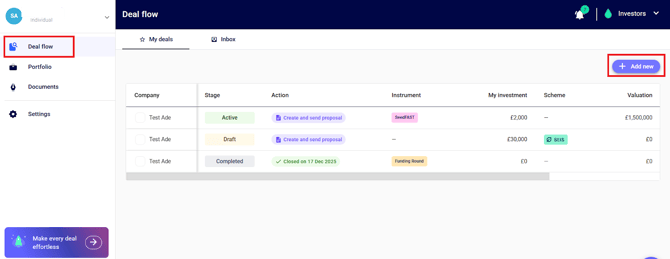
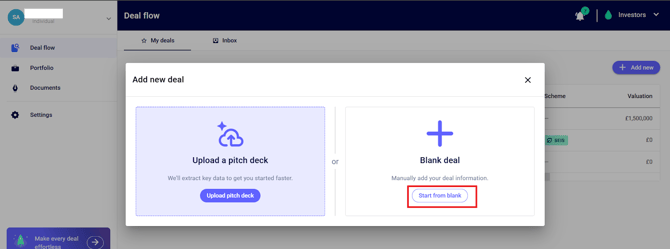
Step 1: Go to the “Deal Flow” section on the left-hand side of the navigation panel, click “+ Add new”, and click “Start from Blank”
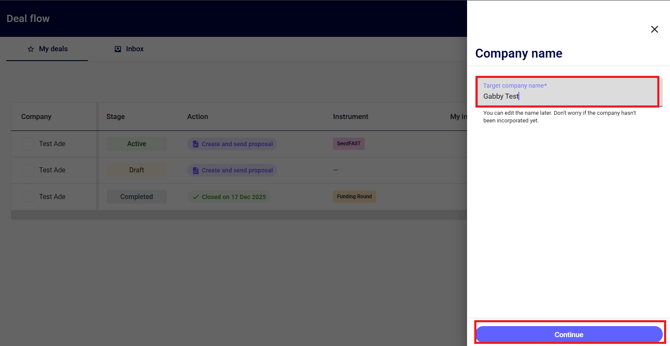
Step 2: Enter the company name and click continue
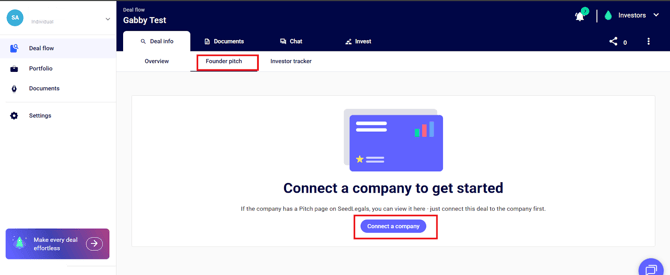
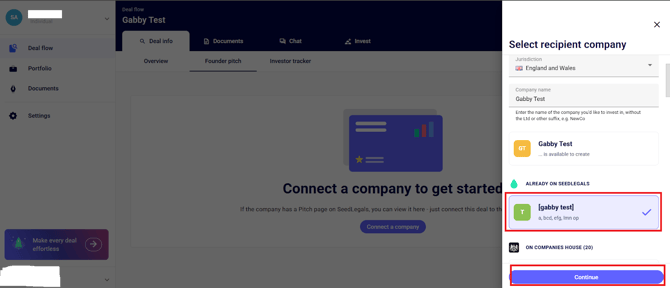
Step 3: Click on the “Founder Pitch” page, and then click “Connect a company”
Next, select the name of the company that’s already registered on Seedlegals, and click continue
Step 4: View the company pitch
Company pitches are now publicly accessible. You can view the full pitch page directly, including the pitch video and investment details.
If required, you can self-certify as a sophisticated investor to access full investment information.
💡 In some cases, founders may still choose to keep their pitch private, in which case access may need to be requested.
Step 5: Register your interest
Once you’ve viewed a pitch, you can register your interest directly from the pitch page.
Click “Register your interest”, write a message to the founder, and submit.
You’ll then be able to continue the conversation using the chat feature.